
Health
Sit right there!
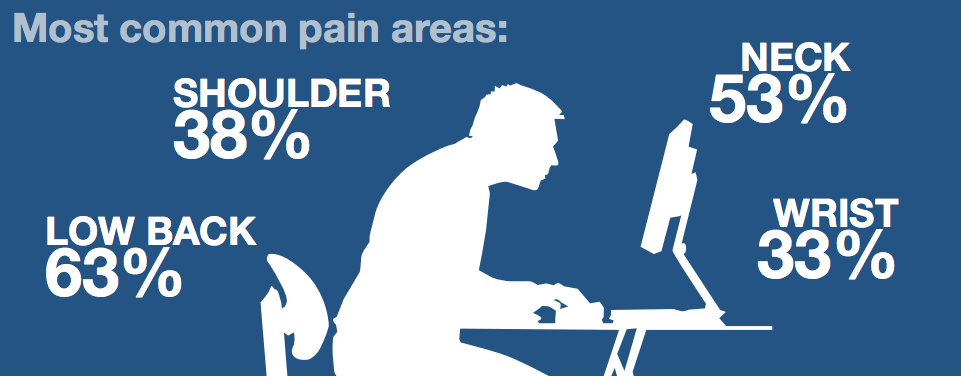 Long hours at a computer can be a pain — in the shoulders back and wrists.
Health advisors at the Mayo Clinic studied the various ergonomic factors involved in working with a computer.
Chair: It should have adjustable armrests, height, lumbar support and seat depth.
Footrest: If desk or chair adjustments don’t allow for keeping feet flat on the floor, use a footrest. A stack of sturdy books can fill the need.

Monitor: Placed at arm’s length and directly in front of you. If you wear bifocals put the top of the screen slightly below eye level.
Arm and wrist: When typing or using your mouse, keep your wrists straight and upper arms close to your body.
Desk: Should be high enough so knees and thighs have clearance underneath the desk.
Mouse and keyboard: They should be within easy reach, side by side on the same desk surface. Use a standard size keyboard.

If you don’t need the keyboard number pad, select a keyboard without it. The saved desk space allows closer placement of the mouse to the actual keyboard area.
When choosing a mouse, fit it into your hand. Roller ball models may be more comfortable and require only movement of the fingers. An optical mouse requires movement of the entire arm.




Front Royal Remains Under Mandatory Water Conservation As Shenandoah River Flow Drops

Front Royal Women’s Resource Center Opens 2027 Dare to Dream Grant Applications

Warner, Mizusawa Outline Competing Approaches to Disability Policy

Fable Greenhouse and Gardens Breathes New Life into Former Horton’s Nursery

Louise Virginia “Mom” Messer (1936 – 2026)

Business Growth Series: Doing Everything Yourself Is Slowing You Down

The Mystery of the Purple Seal

Front Royal Outdoors Founder Don Roberts Named 2026 Protector of the Shenandoah

Front Royal Man Held Without Bond Following Child Sexual Abuse Material Investigation

Performing Arts Center Pointing to 2027 Opening as Local Entertainment, Business, and Educational Partner

Town Planning Commission Continues to Prepare for the Arrival of Cannabis on the Local Market

Warren County Schools Improve, But Federal Rules Lower Seven Ratings

Spanberger Announces $1.3 Million in Scholarships and Incentives for Nursing Students

The First Long-Distance Phone Call Came With Receipts

Middletown Man Killed In I-81 Crash In Frederick County

Cline Backs Veteran Cancer Screening Effort, Highlights Sixth District Programs

Sheriff Cline Details Flock Safeguards, Uses and Limits at Warren County Work Session

Flock Safety: A Tool for the Common Good

Melissa Ichiuji Studio Gallery Reopens With Two Fall Exhibitions

Just Hours Away: Festival Of Leaves Returns To Downtown Front Royal Saturday

Sheriff’s Office Addresses Use of ‘ALPR’ Cameras – Health Insurance, 4-H Week, and Parks & Rec Events Also Presented

Before Relying on a Model, Look at the Assumptions

The Question Is Not Which Apple Tastes Best

Brian Anthony Lamb (1980 – 2026)
